Slap Volleyball Tools
Static controls and scoring helpers you can open between points — not a live calculator.
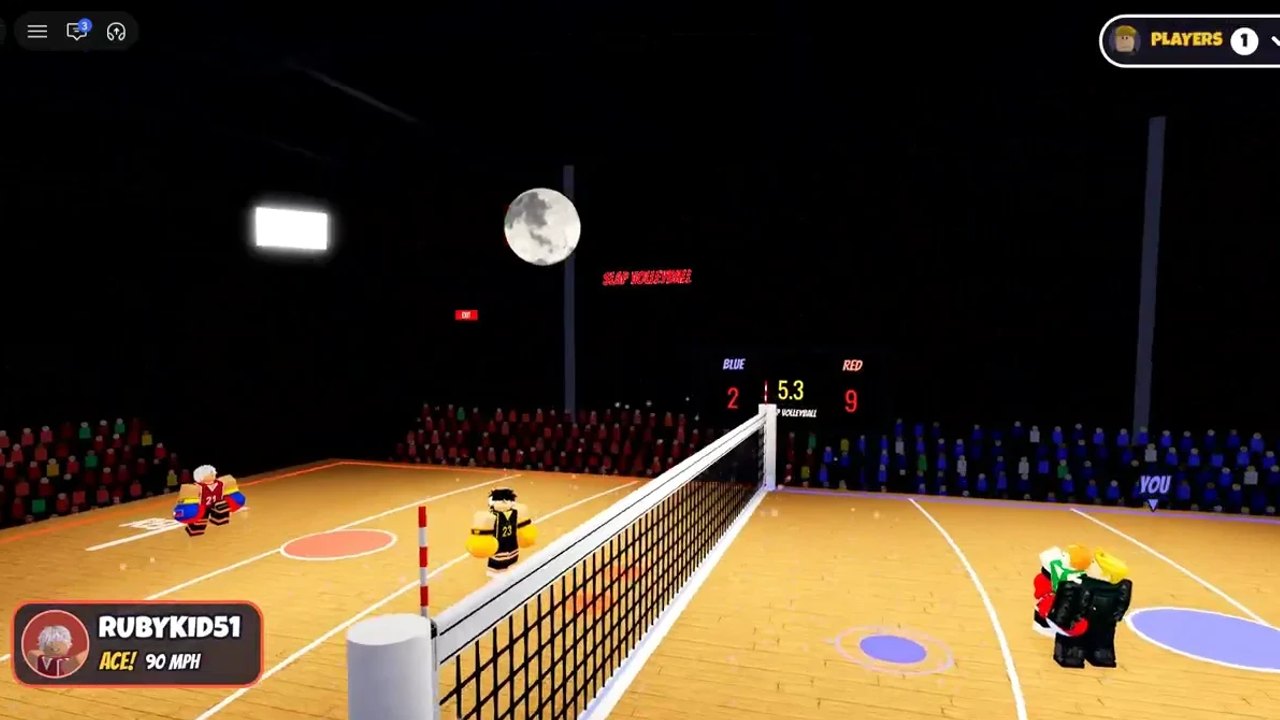
This hub is the wiki’s small toolkit for live Slap Volleyball matches. It is not a live calculator API, not a rank predictor, and not a script runner. The two helpers that matter between points are a controls cheat sheet you can glance at during queue, and the scoring rules explainer that spells out the 8-second shot clock, first to 12 win by 2, Hot Spots, and fire balls. Use them as paper on a second screen while you play Chamagic’s Roblox sport.
Slap Volleyball launched on 8 October 2026. Rallies are short, the HUD is busy, and new players lose points because they forget which key dives or how much a Hot Spot is worth. These pages exist so you do not have to alt-tab through a full guides hub essay while the clock is already at four seconds.
What these tools are (and are not)
They are static. The cheat sheet lists the HUD: LMB Slap, RMB/E Set, Space Jump, Shift Dive, F Float, Ctrl Shift Lock, 1 Chat, 2 Emote, H for the full list. The scoring explainer lists the match contract: land the ball before the shot clock dies, first team to 12 wins, you must lead by 2, a Hot Spot is two points, a 20-hit rally sets the ball on fire, Fist of Fury is a pickup for 110+ MPH slaps. None of that needs a server call.
They are not cheats. If you wanted an auto farm or auto spike, that search belongs on the scripts hub — and the honest answer there is that nothing is confirmed, and executors can ban the account. These tools will not hit the ball for you.
They are not a live API. There is no win-probability widget, no automatic Hot Spot tracker, and no overlay that reads your Slap Rating. If a third-party site claims it “calculates” your next ranked game from this wiki, it is not us.
Controls cheat sheet
Open the controls cheat sheet when you are in the waiting room or after a side-out. It groups keyboard, serve, chat/emotes, and mobile into tables, then adds a match checklist (clock, win-by-two, Hot Spot, fire, Fist of Fury). The long-form version with extra context is the controls guide. If you only forget one bind, remember H — it opens the in-game full list.
Use the sheet to fix the mistakes that look like “I need a script”:
- You keep slapping when a teammate is jumping — that is a Set (RMB or E), covered in how to spike.
- You never reach tips along the floor — that is Dive (Shift).
- You fall out of a jump and watch the clock die — that is Float (F) plus an earlier slap.
- The camera drifts in 3v3 — Ctrl toggles Shift Lock.
Getting Started still comes first if you have not finished a real set yet. Warm-up does not count. The sheet assumes you already know you are in a match.
Match-rules explainer (shot clock, win by 2, Hot Spot, fire)
The scoring “tool” on this wiki is the scoring guide. Treat it like a rules card:
- Shot clock: 8 seconds. Possession dies if you do not land the ball in time. The landing circle is the read, not a decoration.
- First to 12, win by 2. 12–11 is not over. You must lead by two, the same way many real volleyball sets work.
- Hot Spot = 2 points. Chase the marked zone when it is up. Greedy slaps into the empty corner are a one-point donation.
- Fire ball after 20 hits. Long rallies change the pressure. Do not donate the extra touch because you panicked.
- Fist of Fury. Grab the pickup when it is safe; do not waste the 110+ MPH slap into the net.
Those rules are identical in 1v1, 2v2, and 3v3, and they apply on Slap Dome, Sandy Shores, and Picnic Park. Ranked uses the same contract; the ranked guide covers Bronze and Slap Rating, not a different clock.
How to use this hub between matches
A practical loop looks like this:
- Queue. While you wait, skim the controls cheat sheet once.
- Play the set. After a lost clock or a missed Hot Spot, open scoring for the one rule you broke.
- If the loss was mechanical (no jump, no dive), jump back to controls or how to spike.
- If you are grinding rank, read ranked and the move tier list before the next queue, not during the rally.
- Claim codes in the lobby, not mid-point. Redemption is on how to redeem.
- Check updates after a patch so the sheet still matches the HUD.
Cosmetics and badges are not calculators either. They live under players, cosmetics, and badges. Official Roblox destinations are on the links hub. Launch context is on the launch recap and the ranked update.
Keep this hub small on purpose. A second-screen sheet you actually read is more useful than a fake “live tool” that promises to farm the sport for you. When Chamagic adds an in-game trainer or an official overlay, it will be documented as a game feature here. Until then, the toolkit is two pages: binds on the cheat sheet, rules on the scoring explainer, and your hands on the ball.
Frequently Asked Questions
Quick answers for the court, the lobby, and ranked.
Does this wiki have a live Slap Volleyball calculator?
No. The tools are static pages: a controls cheat sheet and the scoring rules explainer. There is no live API.
Where do I look up keys during a match?
Use the controls cheat sheet or press H in game. The long write-up is the controls guide.
Where are shot clock and Hot Spot rules?
They are on the scoring guide: 8-second clock, first to 12 win by 2, Hot Spot = 2 points, fire ball after 20 hits.
Can these tools auto-spike or farm XP?
No. They do not touch the client. Farm and auto-spike searches are covered honestly on the scripts hub — nothing is confirmed, and executors can ban you.
Should I open this during a rally?
Open it in the waiting room or between points. During a rally, play. If you are brand new, read Getting Started before you rely on a sheet.